

“We don’t want to burn money and end up back on Excel.”
That’s the line I hear most often from Indian SME owners considering ERPNext. And it’s a valid fear. Research from Panorama Consulting Group and Gartner consistently places ERP failure rates between 55% and 75%. ERP implementation mistakes are not exotic edge cases — they are patterns repeated across industries and company sizes. The difference between a project that sticks and one that collapses into spreadsheet workarounds comes down to whether your team identifies these patterns before they compound.
This guide documents 12 specific ERP implementation mistakes I’ve seen across manufacturing, trading, and distribution rollouts in India. Each includes the symptom, root cause, consequence, and prevention plan. If you’re evaluating or already running an ERPNext implementation, this is your field checklist.
The 12 ERP Implementation Mistakes
Mistake #1: No defined business outcomes
Symptom: The brief says “implement ERPNext” — not what the business needs to achieve.
Root cause: The owner wants “a system” but hasn’t defined 3–5 measurable outcomes. The partner skips this because vague scoping is easier.
Consequence: Six months in, accounts wanted GST automation, production wanted BOM planning, sales wanted order tracking — none prioritized, all half-done.
Prevention plan: Write 3–5 outcomes with success criteria before signing any contract. Example: “Dispatch-to-invoice gap reduced from 4 days to same-day.” Review the ERPNext implementation timeline to map outcomes to phases.
Practical tip: Print your outcomes on one sheet and tape it to the project war room wall. Every weekly review starts here — not on feature lists.
Mistake #2: Too many modules at once
Symptom: The kickoff plan includes Accounting, Inventory, Manufacturing, HR, CRM, and Assets — all going live in one quarter.
Root cause: Enthusiasm. The owner sees the full module list. The partner agrees because a larger scope means a larger contract.
Consequence: No module reaches production depth. Users are overwhelmed and maintain parallel spreadsheets.
Prevention plan: Start with 2–3 core modules. For most Indian manufacturing SMEs: Stock + Accounting + Buying/Selling. Add Manufacturing in Phase 2. Understand the real cost of scope creep before expanding.
Practical tip: Ask: “If we could only go live with two modules this quarter, which two would change the business most?”
Mistake #3: Dirty master data
Symptom: The item master has 14,000 entries including duplicates (“MS Pipe 1 inch”, “M.S. Pipe 1″”, “MS PIPE 1IN”), no UOM, and 3,000 inactive items.
Root cause: Data exported from Tally without cleanup. Nobody assigned an owner to standardize naming or categorization.
Consequence: Stock reports are meaningless. Purchase orders raised against wrong items. GST HSN mapping fails.
Prevention plan: Assign an internal data owner. Deduplicate, standardize naming, and archive inactive items before import. For companies migrating from Tally to ERPNext, this is the single highest-value activity.
Practical tip: Create a naming rule before cleanup: format, UOM standard (Kg not KG not Kgs), HSN reference. Get sign-off from accounts, purchase, and stores.
Watch out: Don’t delegate data cleanup entirely to a junior data entry operator. The stores manager and accountant must co-own this.
Mistake #4: Wrong opening balances
Symptom: Accounts receivable doesn’t match Tally. Stock-in-hand value is off by ₹12 lakhs. The CFO loses trust on Day 2.
Root cause: Balances imported without reconciliation against the audited trial balance. Stock values taken from a three-month-old count sheet.
Consequence: Finance runs ERPNext and Tally in parallel for months, doubling workload. Eventually they stop entering data into ERPNext.
Prevention plan: Pick a cutoff date (April 1 or start of a quarter). Reconcile every balance against audited figures. Use ERPNext’s Stock Reconciliation tool (docs.frappe.io — Stock Reconciliation) for verified opening quantities.
Practical tip: Run a “Day 1 report” — pull Trial Balance and Stock Balance from ERPNext right after go-live. If they don’t match Tally’s closing within 1%, stop and fix before proceeding.
Mistake #5: UOM chaos
Symptom: You buy in tonnes, store in kilograms, sell in pieces — but nobody set conversion factors.
Root cause: UOM planning was skipped. ERPNext supports conversion factors, but they must be defined upfront.
Consequence: A trading company’s stock showed 500 “units” of a chemical that was actually 500 litres — they raised a purchase order for inventory they already had in six-month supply.
Prevention plan: Document buy UOM, stock UOM, and sell UOM with conversion factors for every item. Test with real purchase-to-sale cycles in staging.
Practical tip: Build a three-column table for your top 50 items: Buy UOM → Stock UOM → Sell UOM. This prevents 80% of UOM confusion.
Mistake #6: No internal project owner
Symptom: The partner sends meeting invites but nobody attends. Decisions postponed because “Sir is travelling.”
Root cause: No dedicated internal champion with authority to make day-to-day decisions.
Consequence: Timeline stretches from 90 days to 8 months. Partner sits idle. Costs increase.
Prevention plan: Appoint someone with 30–50% time allocation, decision authority, and a direct line to the MD.
Practical tip: The project owner should attend every weekly call and be able to say “Yes, we’ll use this workflow” without waiting for the next board meeting.
Mistake #7: Late or insufficient training
Symptom: Go-live day: the stores person can’t create a Material Receipt. Accounts calls the partner for every invoice.
Root cause: One two-hour training session, a week before go-live. Users learned theory but never practiced.
Consequence: Users fall back to WhatsApp and Excel. Data quality collapses within weeks.
Prevention plan: Train module-by-module as each is configured. Use “teach, practice, test”: show the workflow, let users do 10 real transactions, verify they can work independently.
Practical tip: Create a one-page “daily workflow card” per role — stores, accounts, sales. List the 5–7 daily transactions with exact navigation. Laminate it and keep it at their desk.
Watch out: Training the owner’s son is not training the stores team. The people entering 80% of daily transactions need the most practice.
Mistake #8: No approval workflows
Symptom: A ₹8 lakh PO submitted without review. A 30% discount on a sales invoice nobody authorized.
Root cause: Approvals happen over WhatsApp or verbal nods. Nobody configured system controls.
Consequence: Financial leakage. In one rollout, ₹20 lakhs in unauthorized purchases went unnoticed for three months.
Prevention plan: Configure approval rules for POs (value threshold), Sales Invoices (discount), Stock Entries (transfers), and Payments. ERPNext’s Workflow feature supports multi-level, condition-based approvals. (docs.frappe.io — Workflows)
Practical tip: Start with value-based PO approvals and discount-based SO thresholds. These two controls catch most financial leakage in SMEs.
Mistake #9: Over-customizing too early
Symptom: “Our process is different.” Every week a new custom script appears. After 30+ customizations, the system is fragile.
Root cause: Users compare ERPNext to old processes. The partner agrees because they bill by the hour.
Consequence: Version upgrades break code. The partner becomes a permanent dependency. This is among the costliest hidden costs of ERPNext implementation.
Prevention plan: Apply the “3-question test”: (1) Can ERPNext’s standard workflow achieve this? (2) Can a Custom Field solve it without code? (3) Is this a core business need or one person’s preference? Only code if answers are no, no, and “core need.”
Practical tip: Keep a “customization register” listing every request, the decision, the reason, and who approved it. Review monthly.
Mistake #10: No SOP documentation
Symptom: Six months later, a new hire creates purchase invoices without linking them to POs because nobody documented the process.
Root cause: Configuration done, processes never written down. Tribal knowledge sits with 2–3 people.
Consequence: Discipline erodes. New hires follow old habits. Data integrity declines.
Prevention plan: Document 5–7 core processes per department as one-page flowcharts: trigger → steps → output → who approves.
Practical tip: Ask each department head to record a 5-minute screen recording of their key daily workflow. Worth more than a 50-page manual nobody reads.
Mistake #11: No staging environment
Symptom: Every change goes straight to the live system. A print format edit hides GST fields. Nobody notices until a client calls.
Root cause: Only one ERPNext instance was set up.
Consequence: A “small” change disrupts 40 users during business hours.
Prevention plan: Insist on staging + production environments. Test all changes on staging first. Factor this into your implementation cost planning.
Practical tip: Before any change reaches production, test it with 3 real transactions on staging.
Mistake #12: No hypercare or rollback plan
Symptom: Go-live Monday. Partner sends a congratulatory email. By Wednesday, stores is stuck and nobody’s available.
Root cause: Contract ended at go-live. No hypercare period defined.
Consequence: Small problems pile up. Within a month, the sales team is back on Excel.
Prevention plan: Negotiate 4 weeks of hypercare with same-day issue resolution. Define a rollback plan. Contact an experienced partner if your current project lacks this.
Practical tip: Run a “Day 5 retrospective” — gather all users, collect every issue, fix the top 10 before Week 2 ends.
Watch out: A hypercare plan with no response-time SLA is useless. Set specifics — critical issues acknowledged within 2 hours, resolved within 24.
Audit your ERP project risk – talk to our team →
How ERPNext Helps Prevent Common ERP Implementation Mistakes
ERPNext includes features that directly counter several ERP implementation mistakes — but only when configured properly.
Role-Based Permissions control access at the document, field, and action level. A Purchase User can create POs but not view salary records. Permissions apply per stage — creation, submission, cancellation. (docs.frappe.io — Role Based Permissions)
Approval Workflows support multi-level, condition-based approvals. POs above ₹50,000 route to the manager; above ₹2 lakhs, the director. Email alerts notify the next approver automatically. (docs.frappe.io — Workflows)
Document Versioning logs every change with user, timestamp, and field-level detail — critical for audits. Enable “Track Changes” on POs, Sales Invoices, and Journal Entries. (docs.frappe.io — Document Versioning)
Standard Reports include Trial Balance, Stock Balance, AR/AP Aging, and Stock Value vs. Account Value comparison. The Stock Reconciliation tool handles corrective entries. (docs.frappe.io — Stock Reconciliation)
Practical tip: After configuring permissions, log in as each role and verify access. This 30-minute test catches 90% of permission gaps.
Practical tip: Schedule monthly “report validation” — finance and stores compare Stock Balance, Trial Balance, and AR Aging. If these three reconcile, your system is healthy.
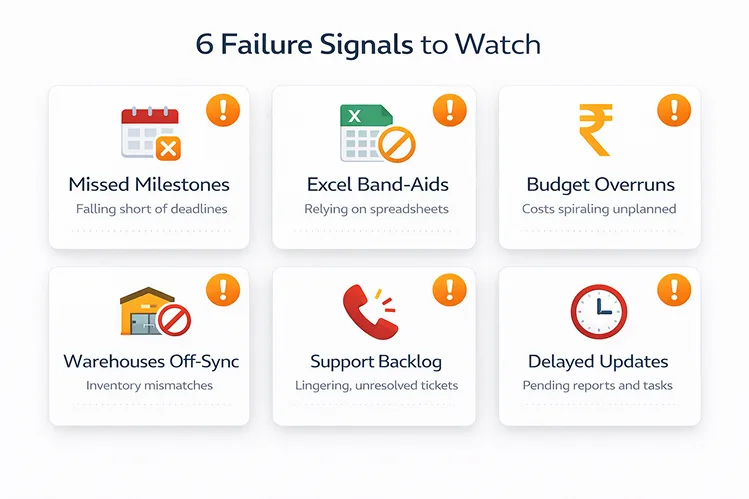
Failure Signals: Early Warning Table
If you see 3+ signals, act this week — not next quarter.
| Early Warning Signal | What It Means | What to Do This Week |
|---|---|---|
| Weekly reviews cancelled 2+ times | Project ownership has collapsed | Re-appoint project owner; block calendars |
| Users maintaining Excel alongside ERPNext | They don’t trust system data | Identify top 3 workarounds; configure ERPNext to replace them |
| Partner invoices exceeding estimates | Scope creep or excess customizations | Freeze new requests; review customization register |
| Stock reports don’t match physical counts | Opening data wrong or transactions skipped | Run Stock Reconciliation; find missing entries |
| Sales sharing orders on WhatsApp | SO workflow is too slow | Simplify SO form; test mobile entry |
| 5+ custom scripts in first 60 days | Customizing instead of adapting | Apply 3-question test; remove unnecessary scripts |
| CFO refuses to stop Tally | Opening balances don’t match | Reconcile Trial Balance between systems this week |
| User hasn’t logged in for 3+ days | Training gaps or unmapped workflow | 1-hour refresher; create daily workflow card |
| Go-live date shifting repeatedly | Requirements or data migration stuck | Hard date with reduced scope |
| Partner team keeps changing | Partner deprioritizing your project | Escalate; demand a named consultant |
| Testing on the production site | No staging environment | Set up staging this week |
| “We’ll fix it after go-live” repeated | Issues deferred, not solved | Go-live readiness checklist; nothing ships with blockers |
Get a prevention plan from our team →
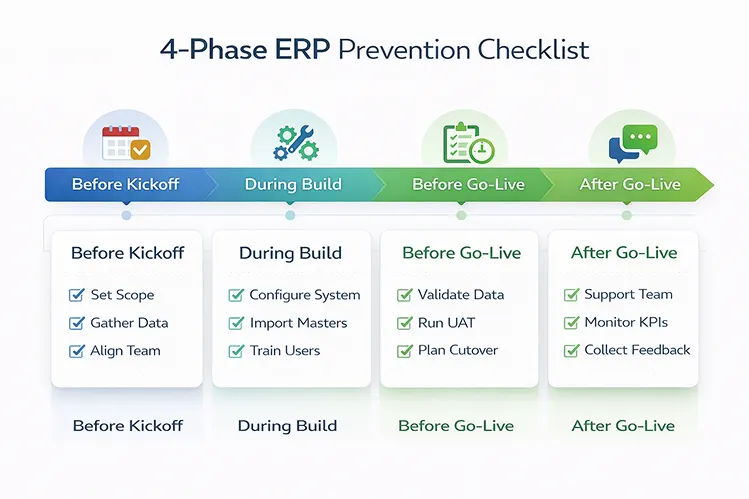
Prevention Checklist by Project Phase
| Phase | # | Checklist Item |
|---|---|---|
| Before Kickoff | 1 | Define 3–5 measurable outcomes with success criteria |
| 2 | Appoint internal project owner with decision authority | |
| 3 | Agree on Phase 1 scope (max 2–3 modules) | |
| 4 | Establish data cleanup timeline with assigned owner | |
| 5 | Confirm contract includes 4-week hypercare | |
| 6 | Set up staging environment before configuration | |
| During Build | 7 | Standardize item naming, UOM, and customer/supplier codes |
| 8 | Deduplicate and clean master data before import | |
| 9 | Configure role-based permissions for every user group | |
| 10 | Set up approval workflows for PO, discounts, transfers | |
| 11 | Enable Document Versioning on financial doctypes | |
| 12 | Test each module with 10+ real transactions in staging | |
| 13 | Maintain customization register with 3-question test | |
| 14 | Train per module — not one combined session | |
| Before Go-Live | 15 | Reconcile opening balances against audited Trial Balance |
| 16 | Verify UOM conversions with 5 purchase-to-sale test cycles | |
| 17 | Confirm every user can independently complete core tasks | |
| 18 | Run Trial Balance, Stock Balance, AR/AP Aging — verify | |
| 19 | Document SOPs for 5–7 processes per department | |
| 20 | Prepare rollback plan | |
| After Go-Live | 21 | Day 5 retrospective — collect and prioritize issues |
| 22 | Monitor logins; follow up with absent users in 2 days | |
| 23 | Stock reconciliation at end of Week 1 | |
| 24 | Schedule monthly report validation meeting |
What I’ve Seen in the Field
A Rajkot auto parts manufacturer went live with all modules at once. Within three weeks, HR data entry was abandoned because that person also handled store receipts. Three months later, only accounting was in use. Smaller scope, done properly, beats ambitious scope done poorly.
A Surat textile trader imported 22,000 Tally items without cleanup. Duplicate item codes caused inflated stock values. Six weeks of manual correction — two people off regular duties — to fix what should have taken 2 weeks before go-live.
A Pune building materials distributor had no PO approval workflow. A branch manager placed a ₹14 lakh order for slow-moving inventory without review. Discovered only when goods arrived and the warehouse had no space.
If You Do Only 5 Things, Do These
- Define 3–5 measurable outcomes before starting. Everything else flows from this.
- Clean master data before import. Deduplicate, standardize naming, verify UOM. This prevents half the ERP implementation mistakes on this list.
- Appoint one project owner with real authority — not the IT person who also manages CCTV.
- Set up approval workflows for POs, discount approvals, and stock transfers.
- Negotiate 4-week hypercare with your partner. The first month determines everything.
Ready to prevent ERP implementation mistakes?
Book a 20-minute ERP success call →
Prefer WhatsApp? Reach us via the contact page.

