

The shopfloor supervisor pulls you aside: “We have 15 pending orders, but I can’t tell you which raw materials are actually available. The Excel sheet shows stock, but it doesn’t match what’s in the bins.”
This is the moment when ERPNext for small manufacturers becomes mission-critical. But here’s where most implementations derail: the consultant enables all 47 manufacturing features on Day 1, your team drowns in complexity, and three months later you’re back to Excel because “the ERP is too complicated.”
The real question isn’t can ERPNext handle small-scale manufacturing — it’s designed for exactly this. The question is: what should you implement first so your shopfloor sees value quickly, without rework later?
This guide provides a practical 2-phase roadmap specifically for ERPNext for small manufacturers — covering what goes live in Phase 1 (4–6 weeks), what you defer to Phase 2 (next 6–12 weeks), and what you should never implement early.
Why Phased Rollout Works for Small Manufacturing
Small manufacturers learn ERP implementation the hard way: by doing too much, too fast. Research on phased ERP rollouts shows that breaking implementations into manageable stages reduces risk and improves adoption rates significantly. For ERPNext for small manufacturers, this matters even more because your team is already stretched thin — running a 12-hour shift doesn’t leave mental bandwidth for learning 40 new screens.
Practical tip: A shopfloor supervisor who sees stock accuracy improve in Week 2 becomes your biggest champion. A supervisor who’s still waiting in Week 8 for “the system to start working” becomes your biggest blocker.
The phased approach for ERPNext for small manufacturers follows a simple principle: establish inventory truth first, then add production control, then refine costing and compliance. Trying to perfect BOM costing before your stock balances are accurate is like adjusting valve timing on an engine that won’t start.
According to ERP implementation research, companies that use phased rollouts report 30-40% fewer post-go-live disruptions compared to big-bang approaches. This is critical when your entire production depends on 3-4 key people who can’t afford a week of downtime to “learn the new system.”
Phase 1 vs Phase 2 Roadmap for ERPNext for Small Manufacturers
Here’s the strategic roadmap showing which capabilities belong in Phase 1 (quick wins) versus Phase 2 (process maturity):
| Capability | Why It Matters | ERPNext Objects | Phase 1 or Phase 2? | Readiness Signal |
|---|---|---|---|---|
| Item master (stock items) | Foundation for all transactions | Item, UOM | Phase 1 | Can list all SKUs with proper naming |
| Warehouse setup | Enables stock tracking | Warehouse | Phase 1 | Physical locations match system locations |
| Stock opening balance | Inventory truth begins here | Stock Entry (Material Receipt) | Phase 1 | Cycle count completed, variances < 5% |
| Purchase Receipt | Goods-in accuracy | Purchase Receipt | Phase 1 | GRN process defined, binning clear |
| Delivery Note | Goods-out tracking | Delivery Note | Phase 1 | Dispatch approval process documented |
| Basic BOM (no operations) | Links raw material to finished goods | Bill of Materials | Phase 1 | Top 20 products have validated BOMs |
| Work Order (simple) | Production tracking starts | Work Order | Phase 1 | One product successfully manufactured end-to-end in system |
| Stock Entry (manufacture) | Backflush consumption, receive FG | Stock Entry (Manufacture) | Phase 1 | Material consumption logic validated |
| Sales Invoice with GST | Clean invoicing for compliance | Sales Invoice, GST Settings | Phase 1 | GST accounts configured, test invoice validated |
| Multi-warehouse transfers | Branch/location stock moves | Stock Entry (Material Transfer) | Phase 1 | If multi-location, otherwise Phase 2 |
| BOM with operations/routings | Tracks shopfloor operations | BOM (with Operations), Workstation | Phase 2 | Operation timings stabilized for top 10 products |
| Job Cards | Granular operation tracking | Job Card | Phase 2 | Operators comfortable logging time per operation |
| Quality Inspection (incoming) | Vendor QC discipline | Quality Inspection | Phase 2 | Inspection parameters documented, rejection process clear |
| Quality Inspection (in-process) | WIP quality gates | Quality Inspection (linked to Job Card) | Phase 2 | Critical checkpoints identified per product |
| Batch/Serial tracking | Traceability for FMCG/pharma | Batch, Serial Number | Phase 2 | Batch numbering scheme finalized, labeling ready |
| Subcontracting/Job-work | Outsourced operations | Purchase Order (Subcontract), Subcontract Stock Entry | Phase 2 | Job-work warehouse setup, vendor onboarded |
| Production Planning | MRP-driven production | Production Plan | Phase 2 | Reorder levels stabilized, lead times documented |
| Advanced costing | Accurate landed cost, operation costing | BOM with operation cost, Landed Cost Voucher | Phase 2 | Phase 1 costs within 10% of actuals |
| E-invoicing & E-way bills | GST statutory compliance | E-Invoice, E-Way Bill JSON | Phase 2 | GSP credentials obtained, one test e-invoice generated |
Watch out: Don’t skip Phase 1 items thinking “we’ll fix stock later.” Clean inventory is the foundation. Skipping it means your Work Orders will show incorrect material availability, your accounts will be wrong, and six months later you’ll be doing a painful reconciliation exercise.
Minimum Master Data for Phase 1: ERPNext for Small Manufacturers
Before you can run a single Work Order, these masters must be configured. Cutting corners here creates rework later.
| Master Data | Required Fields (Minimum) | Common Mistakes to Avoid |
|---|---|---|
| Item (Raw Material) | Item Code, Item Name, UOM, Item Group, “Maintain Stock” = Yes | Using vague names (“Steel plate” instead of “MS Plate 5mm”); Not setting default UOM upfront |
| Item (Finished Goods) | Item Code, Item Name, UOM, Item Group, “Maintain Stock” = Yes, “Include in Manufacturing” = Yes | Forgetting to enable “Include in Manufacturing”; Creating items before finalizing naming convention |
| UOM (Unit of Measure) | UOM Name, “Must be whole number” (for countable items) | Mixing purchase UOM and stock UOM without conversion factors |
| Warehouse | Warehouse Name, Warehouse Type (optional but recommended: Stores, WIP, FG, Scrap) | Too many warehouses in Phase 1 (keep it simple: Stores, WIP, FG); Not defining clear ownership |
| BOM (Phase 1 – Simple) | Item (FG), Quantity, Raw Materials with qty, “Is Active” = Yes, “Is Default” = Yes | Adding operations in Phase 1 BOM (defer to Phase 2); Not submitting BOM (Draft BOMs can’t be used in Work Order) |
| Supplier | Supplier Name, Supplier Group, GST Number (if India), Default Currency | Incomplete GST details (blocks Purchase Invoice); Not linking primary contact |
| Customer | Customer Name, Customer Group, GST Number (if India), Default Currency | Missing billing address with GST state code (causes IGST/CGST errors) |
| GST Accounts (India) | CGST, SGST, IGST accounts in GST Settings, mapped to company | Not setting up output and input GST accounts separately; Wrong account types |
| Tax Templates | In-state GST template (CGST+SGST), Out-of-state GST template (IGST) | Forgetting to link templates to customer/supplier combinations |
| Price List (optional) | Standard Selling, Standard Buying (if using pricing module) | Over-complicating price lists in Phase 1 — manual rates work fine initially |
| Workstation (Phase 2) | Workstation Name, Production Capacity, Working Hours | Defer to Phase 2 unless running Job Cards immediately |
| Operation (Phase 2) | Operation Name, Default Workstation (if applicable) | Defer to Phase 2 unless tracking operation-wise time/costs |
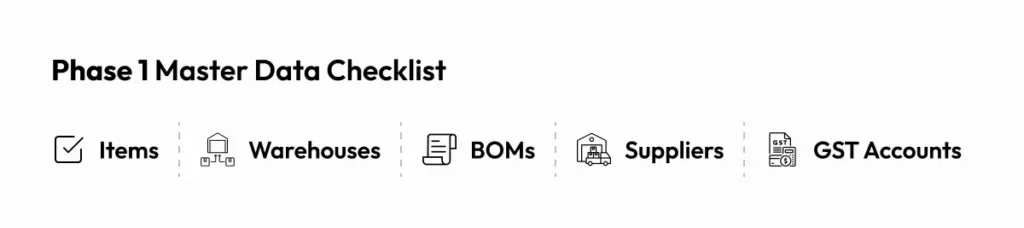
Practical tip: For Phase 1, create Items for your top 20-30 raw materials and top 10 finished goods only. Don’t try to digitize your entire 500-SKU catalog on Day 1. Expand the Item master as you go live with more products.
Watch out: The most painful rework I’ve seen: a manufacturer who created 200 items without setting UOMs properly. Three months later, they had to re-do opening balances because half their stock entries were in the wrong unit (kgs vs pieces). Set UOM discipline from Item #1.
What to Implement First: Phase 1 for ERPNext for Small Manufacturers (4–6 Weeks)
Phase 1’s goal is simple: inventory truth + basic production tracking + clean invoicing. If you achieve these three, your shopfloor will start trusting the system.
Week 1-2: Master Data & Opening Balances
Start with ERPNext implementation fundamentals:
- Item master for active SKUs (raw materials + top finished goods)
- Warehouses (Stores, WIP, Finished Goods minimum)
- Suppliers & Customers with GST details
- Opening stock balance via Stock Entry — this is where most implementations stumble. Do a physical cycle count, reconcile variances, then enter opening balances in a single Stock Entry (Material Receipt type).
Practical tip: Don’t wait for perfect stock data. If your physical count shows ±5% variance, enter what you have and mark it as “Opening Balance – To Be Verified.” You can adjust later with Stock Reconciliation. Waiting for 100% accuracy delays go-live by weeks.
Week 3-4: Purchase & Sales Flow
Enable basic procurement and dispatch:
- Purchase Order → Purchase Receipt → Purchase Invoice (integrate buying with stock)
- Sales Order → Delivery Note → Sales Invoice with GST
- Validate GST calculations (in-state CGST+SGST, out-of-state IGST)
- Run 5-10 test transactions end-to-end
At this stage, even without manufacturing, you’ve achieved inventory accuracy. Your team can now see real-time stock, and your accounts are auto-posting to the GL.
Week 5-6: Basic Manufacturing
Now activate production for 2-3 pilot products:
- Create simple BOMs (raw materials only, no operations)
- Generate Work Orders from Sales Orders or manually
- Material Transfer for Manufacture (Stock Entry: moves RM from Stores → WIP)
- Manufacture Entry (Stock Entry: consumes RM from WIP, receives FG in FG warehouse)
- Validate that stock ledger shows correct consumption and production
Practical tip: Pick one simple assembly product for your first Work Order. Don’t start with your most complex product that has 40 raw materials and 6 operations. Start with something that has 5-8 components and a single manufacturing step.
Phase 1 success metric: By Week 6, you should be able to:
- Check stock availability for any item in real-time
- Create a Work Order, transfer materials, manufacture, and see finished goods updated
- Invoice a customer with GST-compliant output
If you’ve achieved this, Phase 1 is done. You’ve built the foundation for ERPNext for small manufacturers.
What to Add Next: Phase 2 for ERPNext for Small Manufacturers (Next 6–12 Weeks)
Phase 2 builds process maturity on top of Phase 1’s foundation. You’re no longer proving ERPNext works — you’re optimizing how it works.
Operations & Routing (If Applicable)
If you need to track shopfloor operations (cutting, welding, assembly, QC), now’s the time:
- Create Operation masters (Cutting, Grinding, Assembly, etc.)
- Create Workstation masters (Machine-1, Assembly Line-A) with production capacity
- Update BOMs to include operations and routing
- Enable Job Cards to track operation-wise time and cost
Practical tip: Don’t add operations to all BOMs at once. Start with 3-5 critical products where you actually need operation costing or capacity planning. For simple products, a BOM without operations works fine.
Quality Inspection
Add QC discipline:
- Enable Quality Inspection for incoming raw materials (optional: only for critical items)
- Add in-process QC checkpoints linked to Job Cards
- Define inspection templates with acceptance criteria
This is especially critical for FMCG/pharma where batch quality matters. For job-shop manufacturing (make-to-order), you might skip formal QC and rely on final inspection.
Batch/Serial Tracking
If you’re in FMCG, food, pharma, or electronics:
- Enable batch tracking for items with expiry dates
- Enable serial number tracking for high-value items (motors, electronics)
- Validate that Work Orders create batches automatically if needed
Watch out: Enabling batch tracking mid-flight is painful. If you know you’ll need it, enable it in Phase 1 for new items. Retrofitting batches to existing stock is messy.
Subcontracting / Job-Work
If you send raw materials to vendors for processing (common in Indian manufacturing):
- Create Subcontracting BOMs
- Raise Purchase Orders with “Supply Raw Materials” = Yes
- Transfer materials to subcontractor via Stock Entry (Send to Subcontractor)
- Receive finished goods via Purchase Receipt
This is a Phase 2 feature because it requires clean inventory first. If your stock balances are wrong, you’ll transfer incorrect quantities to vendors.
Production Planning & MRP
Move from reactive to planned manufacturing:
- Set reorder levels for raw materials
- Use Production Plan to aggregate demand from multiple Sales Orders
- Generate Material Requests automatically for shortfall items
- Plan production runs in batches
This makes sense once you’ve stabilized Phase 1 and have reliable lead time data.
What NOT to Implement Early in ERPNext for Small Manufacturers (and Why)
Some features feel urgent but create more problems than they solve in Phase 1:
1. Complex Custom Fields & Workflows
Why it’s tempting: “We have a unique approval process, we need custom fields for XYZ.”
Why you should wait: Custom fields added prematurely lock you into workflows before you understand ERPNext’s natural flow. I’ve seen manufacturers add 15 custom fields in Week 1, then realize ERPNext already had that data elsewhere. Rework means data migration pain.
Defer to: Month 4-6, after you’ve run at least 50 real transactions and understand what’s actually missing.
2. Multi-Level BOMs (Initially)
ERPNext supports multi-level BOMs beautifully — you can have sub-assemblies within sub-assemblies. But in Phase 1, flatten your BOMs.
Why? Because debugging a 3-level BOM when stock entries aren’t working yet is a nightmare. Once Phase 1 is stable, add sub-assembly complexity.
3. Over-Customized Reports
ERPNext has 40+ built-in manufacturing reports. In Phase 1, use what’s there. Don’t spend 3 weeks building custom dashboards.
Practical tip: Standard reports like “Open Work Orders,” “Issued Items Against Work Order,” and “BOM Explorer” cover 80% of shopfloor needs. Use those for 3 months before commissioning custom reports.
4. Integrations (Shopify, WooCommerce, etc.)
If you sell online, the temptation is to integrate e-commerce immediately. Resist. Get ERPNext’s core manufacturing flow stable first. Add integrations in Phase 2 once sales invoicing is smooth.
5. Excessive Approval Hierarchies
Small manufacturers love adding “Manager must approve Purchase Orders above ₹50,000” or “Director must approve Work Orders.” These workflows slow you down in Phase 1 when you’re still learning.
Defer to: Phase 2, once transaction velocity is stable.
Review my scope & avoid rework → Not sure what to defer? Let us review your Phase 1 scope to prevent over-engineering.
KPIs & Reports You Should Expect After Each Phase
Phase 1 KPIs (Week 6)
You should be able to answer these questions instantly:
- Stock accuracy: What’s the current stock of Item X? (Stock Balance report)
- Pending orders: Which Sales Orders are pending dispatch? (Sales Order report filtered by status)
- Production status: Which Work Orders are in-progress vs. completed? (Work Order Summary)
- Dispatch readiness: How many finished goods are ready to ship? (Stock Balance in FG warehouse)
- GST liability: What’s my output GST for this month? (GST Sales Register)
Practical tip: If you can’t answer these 5 questions by Week 6, your Phase 1 isn’t done. Don’t move to Phase 2.
Phase 2 KPIs (Month 6)
With Phase 2 complete, you unlock deeper insights:
- Material variance: Are we consuming more RM than BOM says? (Work Order Consumed Materials report)
- WIP visibility: What’s the value of stock sitting in WIP warehouse? (Stock Balance in WIP)
- Rejection rate: What % of incoming materials are failing QC? (Quality Inspection Summary)
- Operation efficiency: Which workstation is the bottleneck? (Job Card analysis, if using operations)
- Subcontractor performance: Which job-work vendor has the longest turnaround? (Subcontract PO vs. actual receipt time)
These aren’t just reports — they’re decisions. A shopfloor manager who can see that “Vendor A takes 12 days vs. Vendor B’s 7 days” starts making smarter outsourcing calls.
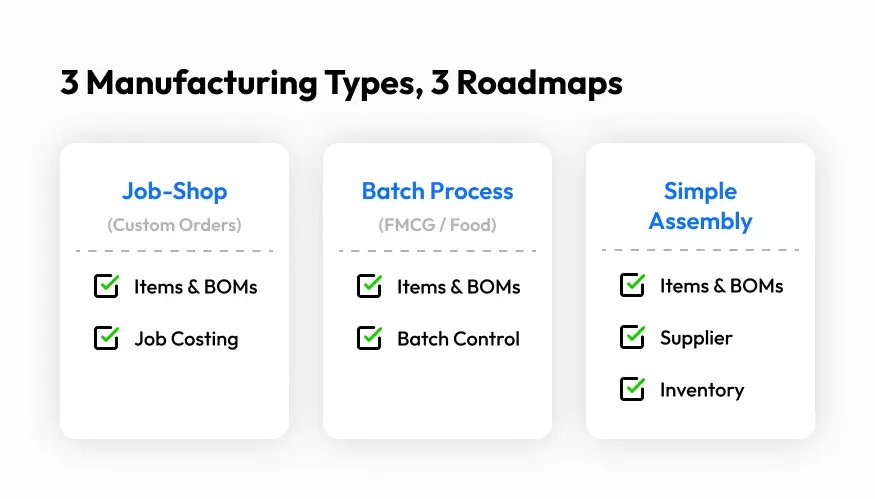
Three Manufacturing Profiles: Phase Planning for ERPNext for Small Manufacturers
Different manufacturing types need different Phase 1/2 splits. Here are three common profiles:
Profile 1: Job-Shop / Fabrication (Make-to-Order)
Example: Custom metal fabrication, machine shops, tool & die making
Phase 1 Scope:
- Items, Warehouses, BOMs (simple, per-order)
- Work Order per Sales Order (1:1 mapping)
- Material Transfer for Manufacture → Manufacture
- Delivery Note → Sales Invoice
Phase 2 Scope:
- Operations if tracking machine time (CNC, lathe, mill)
- Job-work if outsourcing specialized processes (heat treatment, plating)
- Serial numbers if high-value custom parts
Common trap: Trying to standardize BOMs when every order is custom. Instead, use BOM templates or create BOMs on-the-fly per order.
Profile 2: Batch Process / FMCG (Make-to-Stock)
Example: Food processing, cosmetics, chemicals, packaging
Phase 1 Scope:
- Items with batch tracking enabled from Day 1
- BOMs for standard SKUs
- Work Orders in batches (not per Sales Order)
- Stock Entry with batch auto-creation
- Sales Invoice with batch-wise FIFO/FEFO dispatch
Phase 2 Scope:
- Quality Inspection (critical for food/pharma)
- Expiry date tracking and alerts
- Production Planning to maintain safety stock
- Costing refinement (process loss, scrap tracking)
Common trap: Not enabling batch tracking in Phase 1, then trying to retrofit it. This requires stock reconciliation and historical batch assignment — very painful.
Profile 3: Simple Assembly (BOM + Light Routings)
Example: Electronics assembly, furniture, small appliances
Phase 1 Scope:
- Multi-level BOMs (sub-assemblies like PCB, casing)
- Work Orders for FG (auto-explodes sub-assembly BOMs)
- Simple material transfer and manufacture
- Delivery via Delivery Note + Sales Invoice
Phase 2 Scope:
- Operations for assembly line tracking (if needed)
- Quality Inspection for final product (optional for incoming components)
- Serial numbers for warranty tracking (if selling B2C)
Common trap: Modeling every sub-assembly as a separate Work Order in Phase 1. For simple assemblies, use multi-level BOMs and “explode” the BOM in the Work Order so you consume all raw materials in one go.
Phase Planning Checklist: ERPNext for Small Manufacturers
Before you declare Phase 1 or Phase 2 “done,” validate these checkpoints:
Phase 1 Checklist (4-6 Weeks):
- Opening stock entered and reconciled (variance <5%)
- Top 10 finished goods have validated BOMs
- 10+ Purchase Receipts processed successfully
- 10+ Delivery Notes created and dispatched
- 5+ Work Orders completed end-to-end (Material Transfer → Manufacture → FG receipt)
- GST invoices generated (in-state and out-of-state tested)
- Stock ledger shows correct balances for Items/Warehouses
- Accounting entries auto-posted (Perpetual Inventory enabled)
- Shopfloor team can independently create Work Orders and Stock Entries
- Management can pull stock/production reports without consultant help
Phase 2 Checklist (Next 6-12 Weeks):
- BOMs with operations updated for critical products
- Job Cards being used to track operation-wise time (if applicable)
- Quality Inspection templates defined for top 5 items
- Batch/serial tracking working for applicable items
- Subcontracting process tested end-to-end (if applicable)
- Production Plan used to generate Work Orders from Sales Orders
- Material Request auto-generation working for shortfall items
- WIP costing and variance reports in use
- E-invoicing and e-way bill generation tested (India)
- Team trained on Phase 2 features with SOPs documented
Practical tip: Don’t skip the “team can do this independently” checkpoint. If your consultant is still hand-holding every transaction in Month 3, you haven’t truly implemented. True success is when your team owns the system.
Quick Summary
ERPNext for small manufacturers succeeds when you implement in phases, not all at once. Here’s the executive summary:
- Phase 1 (4-6 weeks): Inventory truth + basic production + clean invoicing. Enable: Items, Warehouses, simple BOMs, Work Orders, Stock Entries, Sales/Purchase flow, GST.
- Phase 2 (6-12 weeks): Process maturity. Add: Operations/routings, Job Cards, Quality Inspection, batch/serial tracking, subcontracting, Production Planning, advanced costing.
- Avoid early: Multi-level BOMs, custom fields/workflows, complex approvals, integrations, excessive reports.
- Success metric: By Phase 1 end, your shopfloor trusts stock data and can run production without Excel backups.
The difference between successful and failed ERPNext for small manufacturers rollouts isn’t the ERP — it’s the discipline to phase features based on readiness, not wishlist.
For detailed guidance on timelines, refer to our ERPNext implementation timeline breakdown. If you’re migrating from Tally, check our Tally to ERPNext migration guide for manufacturing-specific considerations. For cost planning, see our ERPNext implementation cost guide. For detailed workflow examples, see our ERPNext manufacturing workflow guide.
Let’s map your Phase 1 scope, identify quick wins, and plan a rollout that doesn’t disrupt your shopfloor.
Book a 20-minute manufacturing ERP call →
Prefer WhatsApp? Reach us via the contact page.
