It is 11 in the morning. Your salesman books 40 cartons for a regular customer over the phone. Twenty minutes later the godown clerk sells the same 40 cartons to a walk-in buyer, because the order sits in a notebook and the stock sits in Tally. Picking an ERP for a trading business comes down to one test: would it have stopped that?
This checklist is for wholesalers and distributors with two or more godowns or branches, a few salespeople and customers who buy on credit, who run on Tally, BUSY or Excel today. We make PrimoERP, so read the part about us knowing that. The rest works for any vendor on your shortlist.
Each check has three parts: why it matters to a trader, a question to put to the vendor in the demo, and what a good answer looks like. Before each demo, send the vendor 20 of your items, five customers and last week’s orders, and ask them to answer with your data instead of theirs.
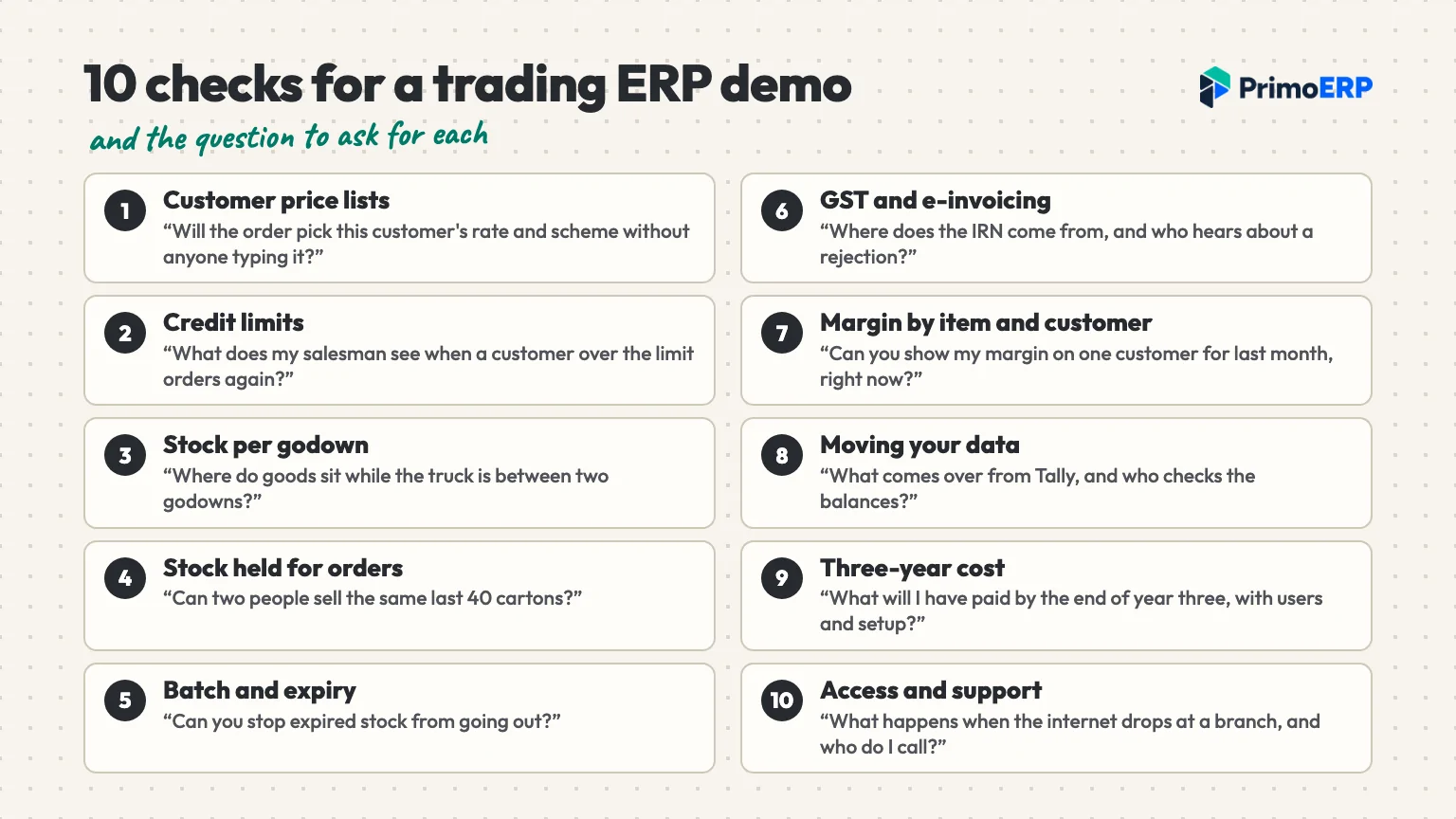
Trading business ERP checks at a glance
| Check | The question for the demo |
|---|---|
| 1. Customer price lists | Will the order pick this customer’s rate and scheme without anyone typing it? |
| 2. Credit limits | What does my salesman see when a customer over the limit orders again? |
| 3. Stock per godown | Where do goods sit while the truck is between two godowns? |
| 4. Stock held for orders | Can two people sell the same last 40 cartons? |
| 5. Batch and expiry | Can you stop expired stock from going out? |
| 6. GST and e-invoicing | Where does the IRN come from, and who hears about a rejection? |
| 7. Margin by item and customer | Can you show my margin on one customer for last month, right now? |
| 8. Moving your data | What comes over from Tally, and who checks the balances? |
| 9. Three-year cost | What will I have paid by the end of year three, with users and setup? |
| 10. Access and support | What happens when the internet drops at a branch, and who do I call? |
The ERP checklist for a trading business
1. Price lists, discounts and schemes per customer
Few traders sell at one price. The retailer down the road gets one rate, the sub-dealer in the next district gets another, and a big buyer gets a scheme such as 10 + 1 free. When those rates live in someone’s head, the wrong one lands on the invoice. Then you either give away margin or lose the customer’s trust.
Ask: “Set up two customers with different rates and a quantity scheme. Now book an order for each and show me the price fill in.”
A good answer: price lists for each customer or customer group, quantity breaks and schemes, all picked by the order on its own. Also ask what happens when a salesman changes the rate by hand. Good software lets you set a discount limit, so anything above it waits for a manager.
2. Credit limits at the moment of the order
Credit is where traders lose sleep. A good customer orders again while last month’s bill is unpaid, and nobody notices until the cheque is late. A limit that only shows up in a month-end ageing report comes too late, because by then the goods have left.
Ask: “This customer’s limit is ₹2 lakh and they owe ₹1.8 lakh, 45 days late. Book a ₹50,000 order. What does my salesman see?”
A good answer: the order screen shows what the customer owes, how overdue it is and how much of the limit is left, before anyone confirms it. An order over the limit should then wait for someone to approve it.
3. Stock in every godown, including goods in transit
The main godown, the branch, a truck on the highway: three places, and the only count you trust is the one you walk to. Transfers cause most of the trouble. If the system drops stock straight into the other godown, the branch shows goods that are still on the road. If nobody records the arrival, they vanish from both.
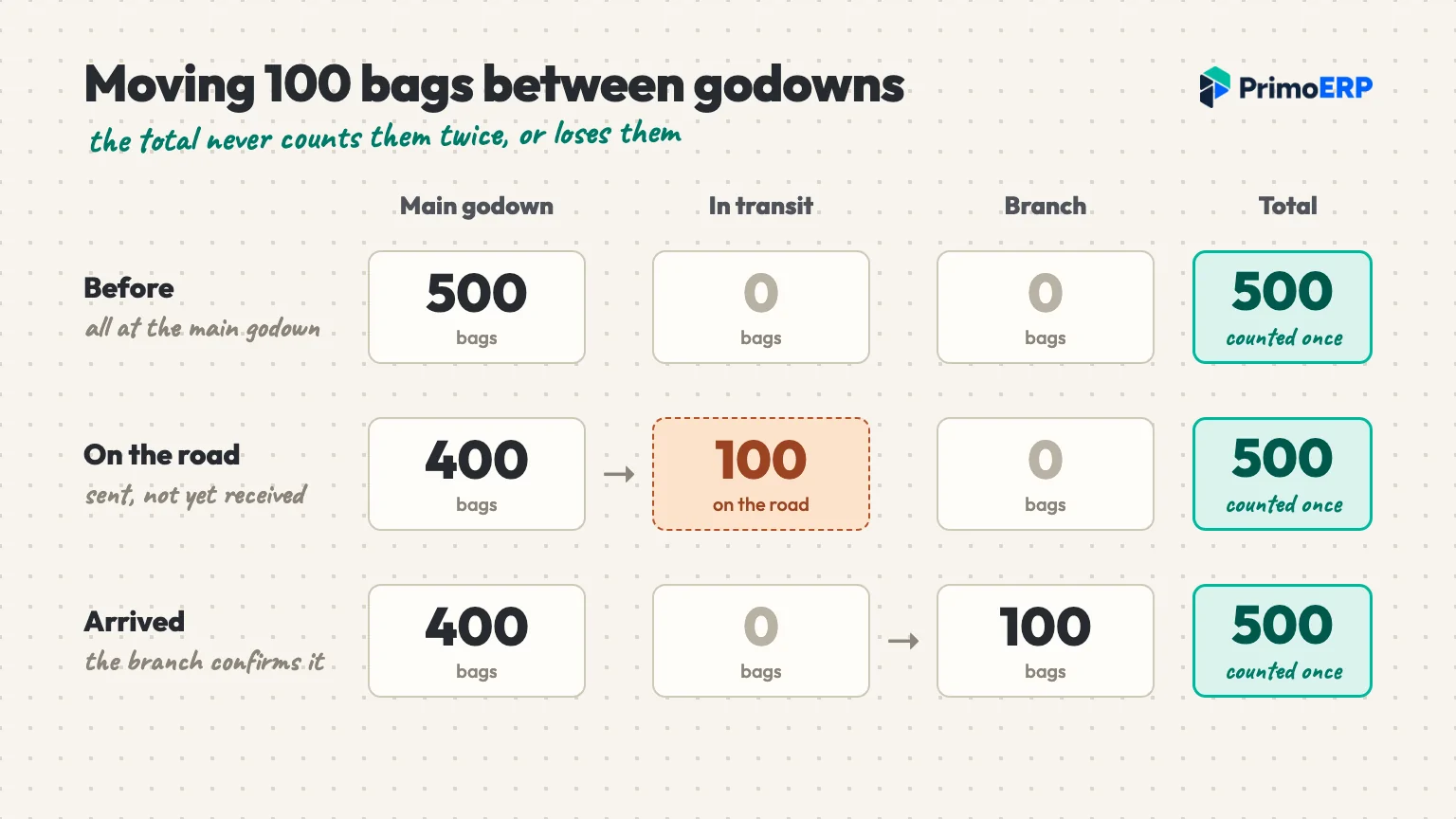
Ask: “Send 100 bags from the main godown to the branch. Before the branch receives them, show me stock at both places and the total.”
A good answer: live stock for each godown and branch, with a separate in-transit position until the receiving side confirms arrival. So the total neither counts those 100 bags twice nor loses them. Also ask whether stock can go below zero. The safe default is no, unless you choose to allow it down to a limit you set.
4. Stock held for confirmed orders
This is the scene from the top of this post. Stock on hand is not stock you can sell, because some of it is already promised. With three salespeople and a counter, “available” has to mean on hand minus what is booked.
Ask: “Two salespeople on two screens both try to sell the last 40 cartons at once. What happens?”
A good answer: the first confirmed order holds the stock for that customer, and the second salesman sees it as gone. Next, the order should become an invoice in one step, without retyping. If a part load goes out, you should be able to bill only what was delivered and leave the rest open.
5. Batch numbers, serial numbers and expiry
If you trade in pharma, food, FMCG, paints or chemicals, an expired batch going out means a return, a penalty or worse. Electronics and appliance traders need serial numbers for warranty claims instead. When the date lives on a label and not in the system, nobody can stop it.
Ask: “Mark one batch as expired. Now try to put it on an invoice.”
A good answer: items carry a batch or serial number and an expiry date, and the software can block expired stock from leaving the godown. If you don’t deal in dated goods, skip this check and don’t pay extra for it.
6. GST, e-invoicing and e-way bills
Every serious option for Indian traders handles GST, so the real question is how much of the work stays on your desk. Two rules matter most here.
First, e-invoicing has applied since 1 August 2023 to businesses with aggregate turnover above ₹5 crore (Notification 10/2023-Central Tax, checked 17 October 2026). GSTN’s e-invoice FAQs add that turnover counts across your PAN, in any year from 2017-18, and that invoices between two of your own GSTINs need an IRN too. That second point catches traders who bill stock to a branch in another state.
Second, a consignment worth more than ₹50,000 generally needs an e-way bill while it moves, says the e-way bill portal’s FAQ at docs.ewaybillgst.gov.in (checked 17 October 2026). This is general information, not tax or legal advice; confirm with your CA.
Ask: “Raise a B2B invoice. Where does the IRN come from, and what happens if the portal rejects it? Then show me the e-way bill for a ₹2 lakh dispatch.”
A good answer: the invoice goes to the IRP from your books, and its IRN and QR code print on it, with no portal upload. A rejection comes back with its reason and reaches a named person. For e-way bills, ask the vendor to make one live from a real dispatch. If it is on a roadmap rather than in the product, get that in writing.
7. Margin by item, customer and branch
Here an ERP earns its keep in a trading business. Margins are thin, so a customer who always wants an extra 2% and pays at 90 days may be costing you money. You only see that if every sale carries what the goods cost you. Most accounting setups give one profit figure for the year, which hides the customer who loses you money.
Ask: “Show me last month’s margin for one customer, then for one item across all branches.”
A good answer: stock valued as it moves, by FIFO, weighted average or standard cost, so margin by item, customer or branch is a report you open. Then ask when the costing method gets fixed. In a careful design you pick it before the first stock movement and it stays, so past figures never shift.
8. How your trading business data comes over
Moving is where many ERP projects stall. Customers, suppliers, items, price lists, opening stock per godown and open balances all have to arrive correct. Otherwise your first month on the new system goes on arguing with it. “We support Tally import” can mean anything from a blank file template to a person who does it with you.
Ask: “Who moves the data, what exactly comes over, and who signs off that the opening balances match?”
A good answer: a clear list of what moves, a named person who does it with you, and a check against your Tally trial balance and stock summary before go-live. Opening stock should load all at once or not at all, so the stock report never disagrees with your books.
9. The three-year cost of a trading ERP
For a trading business, an ERP licence and a subscription look very different in year one and much closer by year three. So add up the software, extra users and branches, renewals or support fees, cloud access if you need it, and setup and training.
Ask: “Put in writing what I will have paid by the end of year three, with 10 users, two godowns and setup.”
A good answer: one number on paper, with nothing left as “extra, on request”.
10. Who can use it, from where, and who helps
A trader’s team is spread out: the owner at home, salespeople in the market, a clerk in each godown, and an accountant who visits twice a month. A trading business ERP installed on one office PC leaves most of them out. Cloud software reaches all of them, but it needs a working internet line at every branch.
Ask: “How many users does my price include, can my accountant log in, and what happens at a branch when the internet goes down?”
A good answer: users included in the price, a login for your accountant, and a straight answer about offline work, even if that answer is “it needs the internet”. For support, ask who sits with you in go-live week and how you reach them after it.
When a trading business doesn’t need an ERP yet
Not every trading business needs a full ERP. If you run one godown with a short customer list and do the billing yourself, TallyPrime or BUSY plus a tidy Excel sheet may serve you for years. Our post on when Tally is enough, and when it isn’t goes through the signs in more detail.
Desktop packages also win on price when one or two people use them. As of 17 October 2026, TallyPrime’s price page lists Silver, for a single PC, at ₹22,500 for a lifetime licence. Gold, for multi-user access on multiple PCs, is ₹67,500 lifetime with a year of TSS, or ₹24,300 for 12 months at the 10% discount shown that day. GST at 18% is extra, and Tally lists e-invoicing and e-way bills among the features of each plan.
BUSY has a strong following among traders too. Its pricing page (checked 17 October 2026) lists BUSY 21 Enterprise, made for multi-branch operations, at ₹22,000 one-time, with offline and online working and unlimited simultaneous users across offices. Renewing BLS for a single user costs ₹7,500 per 360 days, and BUSY Online cloud access is ₹10,800 per 360 days, both before GST. If your branches have patchy internet, that offline mode is a real advantage.
Where PrimoERP fits as an ERP for trading
PrimoERP is one option for that shortlist. Here is what our trading and distribution page says it does, matched to the checks above:
- Price lists, discounts and schemes for each customer or group, picked by the order (check 1).
- A credit limit and terms for each customer; a new order shows what they owe, how late it is and how much limit is left (check 2).
- Live stock per warehouse and branch, with transfers shown as in transit until they arrive (check 3).
- Orders that check live stock and hold it, then become an invoice in one step, numbered in one unbroken series (check 4).
- Batch or serial numbers and expiry dates, with expired stock blocked from going out (check 5).
- E-invoices reported to the IRP from your books, with the IRN and QR code printed; if the IRP rejects one, the reason comes back and your finance controller is told (check 6).
- Cost by FIFO, weighted average or standard cost, so margin by item, customer or branch is a report (check 7).
- We bring in your customers, suppliers, items, price lists, opening stock and balances, then check the numbers with you before go-live (check 8).
It runs in a web browser on any computer, Mac included, with nothing to install. Your accountant gets a free login on top of the included users. We sit with you in go-live week, then stay on phone, WhatsApp and email.
PrimoERP’s price over three years
Our trading setup starts on the Growth plan, which includes warehouse transfers, 10 users, three GSTINs and five warehouses. It costs ₹4,999 a month billed annually, plus GST (checked 17 October 2026), so three years come to ₹1,79,964 before GST. Add a one-time Quick Start onboarding at ₹9,999, or Guided Go-Live at ₹39,999 for more hands-on help. That puts the three-year total between ₹1,89,963 and ₹2,19,963. Each extra user is ₹399 a month, the full list is on our India pricing page, and the free trial runs 14 days with no card.
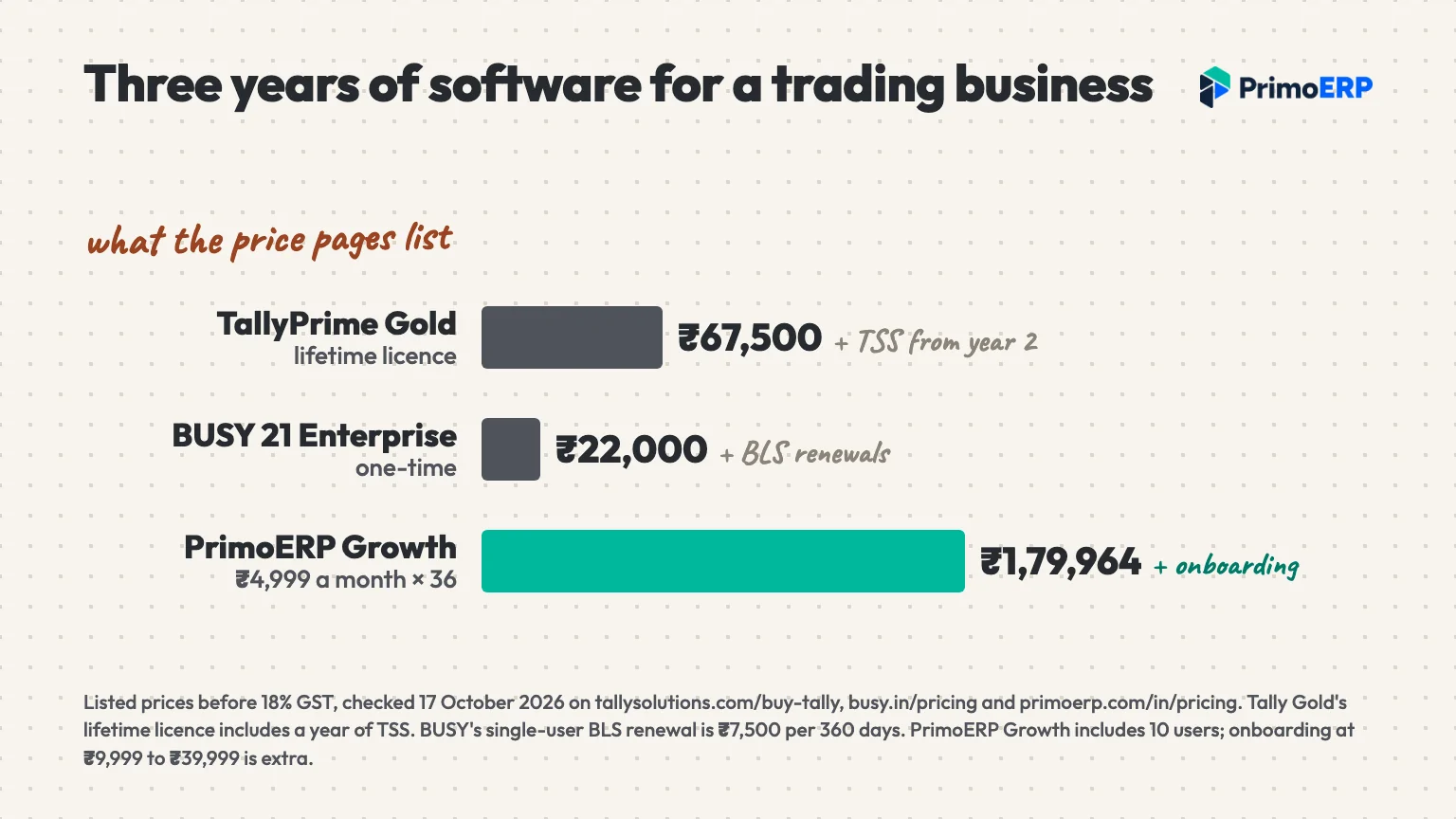
On paper, that is more than a Tally Gold lifetime licence. What the extra pays for is one system that ten people in different places open in a browser, with sales, stock and accounts together. If you don’t need that, the licence is the better buy.
When PrimoERP isn’t the right fit
If your branches work offline for long stretches, PrimoERP will frustrate you, because it needs an internet connection. The same goes if you prefer a one-time licence to a subscription, or if only your accountant uses the books and knows Tally well.
Next step
Choosing an ERP for your trading business gets easier when every vendor faces the same test. Pick your three shortlisted vendors and send each one the same small set of data: 20 items, five customers with their rates and one open transfer. Then run the ten checks in every demo and score the answers side by side. If PrimoERP is on your list, book a free 30-minute demo and we will go through this checklist with your kind of data.

Abidhusain Chidi
Founder & CEO, QalbIT Infotech
Abidhusain Chidi is the founder and CEO of QalbIT Infotech, a software agency in Ahmedabad building web and SaaS products since 2018. He's also CTO at Seekly, an Australian revenue intelligence platform, and is building LiftUp. He writes about CRM, SaaS operations, and shipping multiple products as a small team.
see it live
Run the whole business from one system
Book a free demo and we will walk you through PrimoERP for your industry, with your own items and customers.